

Structure object#
The AbiPy structure inherits from the pymatgen structure,
so all the methods and tools already available in pymatgen can be used.
In this notebook, we mainly focus on the extensions added by AbiPy.
For the features provided by pymatgen, please consult the
official pymatgen documentation.
abipy.core.structure.Structure and pymatgen.core.structure.Structure
import warnings
warnings.filterwarnings("ignore") # to get rid of deprecation warnings

# Import abipy modules
from abipy import abilab
from abipy.abilab import Structure
import abipy.data as abidata

# Useful tools we'll need later on.
from pprint import pprint
import numpy as np

# This line configures matplotlib to show figures embedded in the notebook.
# Replace `inline` with `notebook` in classic notebook
%matplotlib inline

# Option available in jupyterlab. See https://github.com/matplotlib/jupyter-matplotlib
#%matplotlib widget
Reading a structure from file#
A structure object can be initialized from several file formats:
CIF
POSCAR/CONTCAR
CHGCAR
LOCPOT
vasprun.xml
CSSR
ABINIT netcdf files
pymatgen’s JSON serialized structures
Note, in particular, that the structure can be initialized from the netcdf files
produced by Abinit (GSR.nc, WFK.nc, etc.) as well as from text files
such as the Abinit input/output files or even the DDB file.
To initialize the structure from a CIF file, use the from_file method:
structure = Structure.from_file(abidata.cif_file("si.cif"))
print(structure)
Full Formula (Si2)
Reduced Formula: Si
abc   :   3.866975   3.866975   3.866975
angles:  60.000000  60.000000  60.000000
pbc   :       True       True       True
Sites (2)
  #  SP       a     b     c
---  ----  ----  ----  ----
  0  Si    0     0     0
  1  Si    0.25  0.25  0.25
Note
abidata.cif_file, abidata.ref_file and abidata.pseudos
are helper functions that return the absolute path of the reference files shipped with the AbiPy package.
In your scripts, you can directly pass a string or a list of strings with the paths to your files.
To read the structure from an Abinit netcdf file, use:
structure = Structure.from_file(abidata.ref_file("si_nscf_GSR.nc"))

print(structure.to_string(verbose=1))  # Use to_string with verbose > 0 to get more info
Full Formula (Si2)
Reduced Formula: Si
abc   :   3.866975   3.866975   3.866975
angles:  60.000000  60.000000  60.000000

Spglib space group info (magnetic symmetries not taken into account).
Spacegroup: Fd-3m (227), Hall: F 4d 2 3 -1d, Abinit spg_number: 227
Crystal_system: cubic, Lattice_type: cubic, Point_group: m-3m

  Idx  Symbol    Reduced_Coords              Wyckoff      EqIdx
-----  --------  --------------------------  ---------  -------
    0  Si        +0.00000 +0.00000 +0.00000  (2a)             0
    1  Si        +0.25000 +0.25000 +0.25000  (2a)             0

Abinit Spacegroup: spgid: 227, num_spatial_symmetries: 48, has_timerev: True, symmorphic: True
Use to_abivars to get a Python dictionary with the Abinit variables:
structure.to_abivars()
{'natom': 2,
 'ntypat': 1,
 'typat': array([1, 1]),
 'znucl': [14],
 'xred': array([[0.  , 0.  , 0.  ],
        [0.25, 0.25, 0.25]]),
 'acell': [1.0, 1.0, 1.0],
 'rprim': array([[6.32850055, 0.        , 3.6537615 ],
        [2.10950018, 5.96656754, 3.6537615 ],
        [0.        , 0.        , 7.30752299]])}
and the abi_string property to get a string that can be used directly in the input file:
print(structure.abi_string)
 natom 2
 ntypat 1
 typat 1 1
 znucl 14
 xred
    0.0000000000    0.0000000000    0.0000000000
    0.2500000000    0.2500000000    0.2500000000
 acell    1.0    1.0    1.0
 rprim
    6.3285005521    0.0000000000    3.6537614973
    2.1095001840    5.9665675402    3.6537614973
    0.0000000000    0.0000000000    7.3075229946
To visualize the structure with matplotlib, use:
structure.plot();
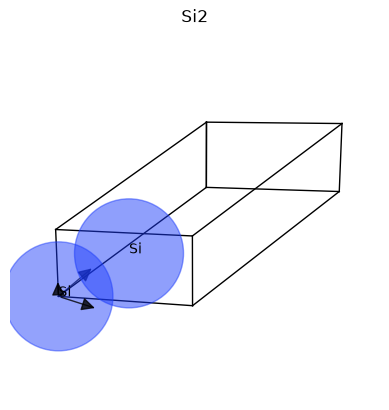
The matplotlib version is minimalistic, but it plays well with Jupyter notebooks. For more advanced visualization, we suggest using a specialized graphical application. Fortunately, external applications can be invoked directly from AbiPy with e.g.
# structure.visualize("vesta")
provided VESTA is installed on your machine and the executable can be found in $PATH.
To get a structure from the Materials Project database, use:
# Remember to set the env variable PMG_MAPI_KEY in your ~/.pmgrc.yaml files.
si2_mp = Structure.from_mpid("mp-149")
print(si2_mp)
---------------------------------------------------------------------------
ValueError                                Traceback (most recent call last)
Cell In[8], line 2
      1 # Remember to set the env variable PMG_MAPI_KEY in your ~/.pmgrc.yaml files.
----> 2 si2_mp = Structure.from_mpid("mp-149")
      3 print(si2_mp)

File ~/work/abipy_book/abipy_book/abipy/abipy/core/structure.py:406, in Structure.from_mpid(cls, material_id)
    403 # Get pytmatgen structure and convert it to abipy structure
    404 from abipy.core import restapi
--> 406 with restapi.get_mprester() as rest:
    407     new = rest.get_structure_by_material_id(material_id)
    408     return cls.as_structure(new)

File ~/work/abipy_book/abipy_book/abipy/abipy/core/restapi.py:37, in get_mprester()
     35 def get_mprester():
     36     """Build and return MPRester instance."""
---> 37     rester = MPRester()
     38     # print(f"{type(rester)=}")
     39     return rester

File /usr/share/miniconda/envs/abipy/lib/python3.14/site-packages/pymatgen/ext/matproj.py:119, in MPRester.__init__(self, api_key, include_user_agent)
    116     self.api_key = SETTINGS.get("PMG_MAPI_KEY", "")
    118 if len(self.api_key) != 32:
--> 119     raise ValueError(
    120         "Invalid or old API key. Please obtain an updated API key at https://materialsproject.org/dashboard."
    121     )
    123 self.preamble = SETTINGS.get("PMG_MAPI_ENDPOINT", "https://api.materialsproject.org/")
    125 self.session = requests.Session()

ValueError: Invalid or old API key. Please obtain an updated API key at https://materialsproject.org/dashboard.
When we have multiple structures and need to compare their lattice parameters,
we can use dataframes_from_structures to build pandas DataFrames:
dfs = abilab.dataframes_from_structures([structure, si2_mp], index=["CIF", "MP"])
then we can compare the lattice parameters with:
dfs.lattice
Note that all AbiPy robots have this feature built in.
It is often easier to build a robot directly from files
and then compare the structures with e.g. robot.get_lattice_dataframe().
Converting to other formats#
Use structure.convert(format) to get the string representation in the new format:
for fmt in ("cif", "POSCAR", "qe"):
    print((" Abinit --> %s " % fmt).center(80, "*"))
    print(structure.convert(fmt=fmt))
Getting info on the structure#
print(structure.reciprocal_lattice)
structure.reciprocal_lattice.matrix.T @ structure.lattice.matrix / (2 * np.pi)
# List of high-symmetry k-points.
print(structure.hsym_kpoints)
The calc_ksampling method returns an efficient sampling of the Brillouin zone
given the number of divisions to be used for the smallest vector of the reciprocal lattice:
pprint(structure.calc_ksampling(nksmall=10))
To get the recommended high-symmetry \(k\)-path in reduced coordinates:
structure.calc_kptbounds()
The high-symmetry \(k\)-path is automatically selected assuming the structure fulfills the convention described in Setyawan2010.
To visualize the Brillouin zone with matplotlib, use:
structure.plot_bz();
For the plotly version, use:
structure.plotly_bz();
Note
The name of the plotly method (if implemented) is obtained by replacing the plot verb with plotly.
To get the number of valence electrons for a given set of pseudopotentials:
structure.num_valence_electrons(pseudos=abidata.pseudos("14si.pspnc"))
To plot the X-ray diffraction pattern with the pymatgen XRDCalculator, use:
structure.plot_xrd();
The abistruct.py script#
The abistruct.py script provides a handy command-line interface to operate on structures read from external files. Several options are available, as well as an interface to the materials project and the COD databases.
To obtain the list of available commands, use:
!abistruct.py --help
Creating a GUI inside a notebook#
Several AbiPy objects provide a get_panel method that allows one to create a panel GUI
exposing some of the underlying AbiPy methods.
Similar capabilities are also available via the AbiPy GUI web app.
To build a panel GUI for a given structure, use:
abilab.abipanel()
structure.get_panel()
This cell is not executed in the online book, since the GUI requires a live Jupyter notebook.